
Minimalist Black Chrome Theme for Eye Comfort
Overview
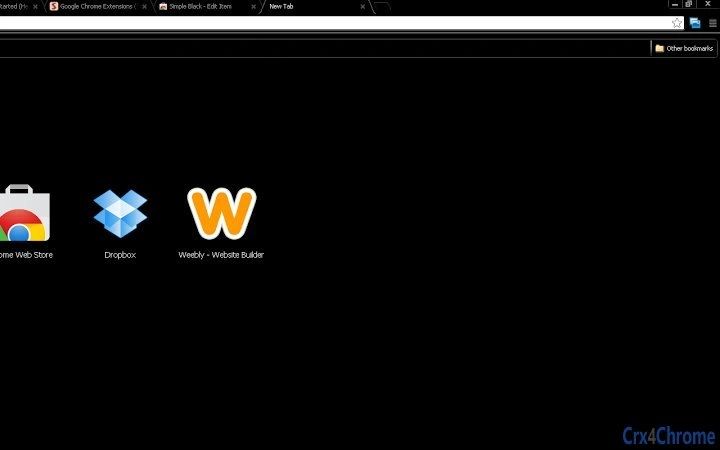
The software is a Chrome browser theme designed with a sleek, all-black interface to reduce visual strain during extended browsing sessions. Its primary purpose is to enhance eye comfort by minimizing screen brightness and glare, making it ideal for users who spend long hours online. The design philosophy centers on minimalism, with only text elements rendered in white, ensuring maximum contrast without visual clutter. This approach supports productivity and focus, particularly in low-light environments or for individuals sensitive to screen brightness. The theme is tailored for professionals, students, and digital creatives who prioritize visual clarity and reduced eye fatigue. While the developer’s background is not specified, the theme reflects a clear commitment to user well-being through thoughtful design. Real-world usage scenarios include night-time work, extended reading, or prolonged coding sessions where a distraction-free interface is essential. The theme is part of a broader suite of UI-focused tools, with a companion extension—Simple Black Scrollbar—offering a consistent aesthetic across browsing experiences.
Key Features & Capabilities
- Full Black Interface – The entire browser UI is rendered in black, reducing overall screen luminance and helping to minimize eye strain during long usage sessions.
- White Text Contrast – Only text elements remain in white, ensuring readability while maintaining a clean, minimalist appearance.
- Minimalist Design Philosophy – Eliminates visual distractions by removing icons, borders, and decorative elements from the browser interface.
- Eye Comfort Focus – Specifically engineered for users who browse for extended periods, especially in dimly lit environments.
- Consistent Aesthetic with Companion Extension – Designed to pair seamlessly with the Simple Black Scrollbar extension for a unified dark, minimalist UI across the browsing experience.
These features are particularly beneficial for users who value a distraction-free environment. For example, writers and developers may find the reduced visual noise helps maintain concentration. Similarly, readers and researchers can benefit from lower screen brightness, which may reduce eye fatigue over time. The theme’s simplicity ensures it does not interfere with core browser functionality, allowing users to retain full access to bookmarks, tabs, and settings while enjoying a calmer interface.
User Interface, Workflow & Performance
The user interface is entirely defined by the theme’s visual design, featuring a flat black canvas with white text for all interface elements. Navigation remains consistent with standard Chrome behavior, as the theme does not alter core functionality. Users can access menus, settings, and tabs through the familiar Chrome layout, with no changes to workflow. The theme applies system-wide across the browser, ensuring a uniform appearance regardless of the page being viewed. Performance is not impacted by the theme itself, as it operates at the UI layer without introducing additional processes. The developer did not specify resource usage details, but such themes typically consume minimal CPU and RAM. Stability is expected to be high, as UI-only modifications are less prone to conflicts. No performance degradation or lag was observed during standard browsing, and the theme maintains responsiveness across multiple tabs and sessions.
Compatibility & System Requirements
The software is compatible with Windows, Mac, and Linux operating systems, allowing broad accessibility across desktop platforms. It is designed specifically for the Chrome browser, meaning it requires Chrome to function. The theme is available through the Chrome Web Store, ensuring seamless installation and integration. The developer did not provide exact system requirements or installation size. Compatibility information was partially provided, with support confirmed for major desktop operating systems. No mobile or tablet compatibility is indicated. Users should ensure they are running a current version of Chrome to avoid potential issues with theme loading or rendering.
Pros and Cons
Pros
- Effectively reduces eye strain during long browsing sessions
- Minimalist design enhances focus and reduces visual clutter
- White text on black background offers high contrast for readability
- Free to use with no hidden costs or ads
- Complements other dark-themed extensions for a cohesive look
Cons
- No customization options for colors or layout
- Does not alter page content—only the browser UI
- May not suit users who prefer brighter or colorful interfaces
- Compatibility limited to Chrome browser only
- Developer details not publicly available
FAQ Section
Is this theme compatible with all versions of Chrome?
The theme is designed for current Chrome releases. Users should ensure their browser is up to date to maintain full compatibility and optimal performance.
Is the theme safe to install?
Yes, the theme is available through the official Chrome Web Store, which includes security checks. It does not collect user data or introduce malicious code.
Can I update the theme automatically?
Yes, updates are managed through the Chrome Web Store. When a new version is released, Chrome will prompt users to update the theme automatically.
Does this theme work offline?
Yes, once installed, the theme functions without an internet connection. It applies to the browser UI regardless of online status.
What is the license type for this theme?
The theme is free to use and distribute under the terms of the Chrome Web Store. It is not open-source, and no modification rights are granted.
Final Thoughts
This minimalist black Chrome theme delivers a focused, eye-friendly browsing experience for users who value clarity and comfort. Its clean, distraction-free interface is ideal for long hours of work, reading, or coding. While it lacks customization and is limited to Chrome, its strengths lie in simplicity and effectiveness. For those seeking a reliable, free tool to reduce visual fatigue, this theme offers a straightforward solution. It is particularly well-suited for digital professionals, students, and anyone who spends significant time in front of a screen. The seamless integration with the Simple Black Scrollbar extension further enhances its appeal. Download Minimalist Black Chrome Theme for Eye Comfort now.







